Help centre
Dashboard Overview
A tour of the Publicus dashboard, your high-level snapshot of current contracting activity and next steps.
Upon logging in to os.publicus.ai, you arrive at your Dashboard, the heart of your Publicus experience. This screen gives you a high-level snapshot of your current contracting activity and the next steps to take.
Summary cards
- Recommended Today - Shows how many new AI-matched opportunities await your review.
- Saved Opportunities - Displays the total number of bids you've explicitly saved for deeper follow-up.
- Active Proposals - Indicates how many bids are currently in your proposal pipeline (tracked via your Kanban board).

Main workflow
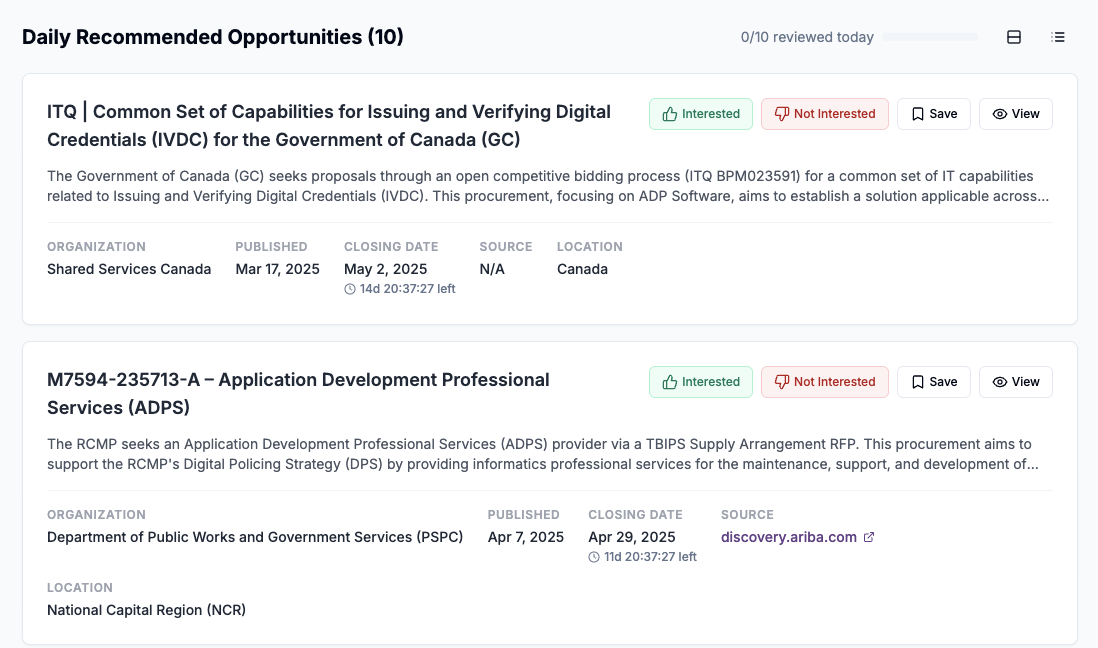
- Review today's matches. Scroll through the list of curated opportunities. Each card shows title, agency, published/closing dates, source, and region.
- Provide feedback. Interested moves the opportunity into your pipeline, Not Interested trains the AI and clears it from today's list, and Save adds it to your Saved Opportunities board.
- Track progress. A running counter at the top right tracks how many cards you've processed (for example, "4 / 10 reviewed today").
- Review history. Below the new matches you'll see a Reviewed Today section with quick links to any you want to revisit.
Navigation
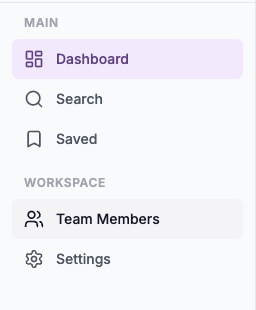
- Saved (left sidebar): Opens your Kanban pipeline for active bids
- Search (left sidebar): Jump to semantic search across all covered portals
- Settings (left sidebar): Tweak notifications and integrations
Next up
- Read Daily Recommended Opportunities to master your review workflow
- Visit Saved Opportunities for an in-depth look at your bid pipeline
- Adjust notification preferences in Settings to control email frequency