Help centre
Daily Recommended Opportunities
Quickly review and qualify your daily AI-matched government contract opportunities to keep your pipeline fresh.
Overview
- Every morning, Publicus compiles a list of new opportunities tailored to your business.
- Your feedback trains our AI, ensuring future recommendations improve over time.
Your daily task
- Navigate to the Dashboard. The "Recommended Today" panel displays up to 10 new opportunity cards.
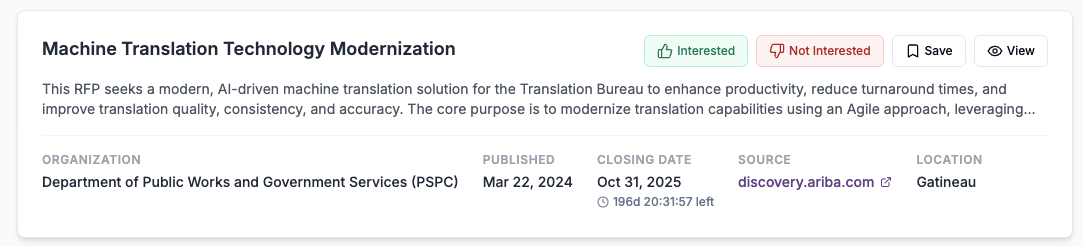
- Review each card. Every card shows:
- Title and snippet: Brief description of the opportunity
- Organization: Procuring government body
- Published date and closing date: Includes a live countdown timer
- Source and region: Original portal and geographic area
Actions
- Interested (thumbs up) - Moves the opportunity into your Saved Opportunities pipeline and sends a positive signal to the AI.
- Not Interested (thumbs down) - Dismisses the card from today's list and sends a negative signal to the AI.
- Save - Explicitly adds the opportunity to your Kanban board for tracking.
- View Details - Opens the detailed opportunity page. Click Back to Dashboard to return to your list.
Progress tracking
- A counter (for example, "4 / 10 reviewed today") updates as you act on cards.
- Once all cards are processed, the message "All recommendations reviewed for today!" appears.
- Below your daily list, the Reviewed Today section shows quick links to revisit cards.
Tips and best practices
- Aim to review all cards daily to keep your pipeline fresh.
- Use the Save action for high-potential leads, then manage them in your pipeline.
- Negative feedback sharpens AI accuracy, so use Not Interested liberally on irrelevant bids.
Next steps
Proceed to the Saved Opportunities article to learn how to manage bids in your pipeline.